


Cleaning up Jira custom fields: a runbook where every step has its undo
Also published on Atlassian Community
With 700 fields per space now enforced in Jira Cloud, many admins are looking at custom field lists with hundreds of entries nobody remembers creating. The removal itself is a few clicks. The hard part is knowing what breaks, and how you get it back if something does.
LimitRadar is a limits and cleanup app for Jira Cloud from Radrly. This guide is a custom field cleanup runbook in native Jira where each step names its undo, followed by how LimitRadar runs the same steps.
The native runbook
| Step | What you do | How you undo it |
|---|---|---|
| 1. Find candidates | List fields that look unused | Nothing to undo |
| 2. Check references | Look for the field in filters, boards, dashboards, workflows and Automation | Nothing to undo |
| 3. Keep the values | Export work items where the field has a value | The export is your copy |
| 4. Remove from a scheme or delete | The actual change | Add it back, or restore within 60 days |
| 5. Wait and watch | Leave it for a few weeks | Restore if something complains |
| 6. Let the 60 days pass | Jira deletes the field for good | No undo |
Step 1. On Premium and Enterprise, the site optimizer has a Review and clean up view listing custom fields that are not used in any spaces, contexts or screens, as described in Optimize fields per space. On Standard you work from the Fields list in Jira settings.
Step 2. This is where most cleanups go wrong. A field missing from every screen can still be used in a saved filter behind a dashboard, a board's quick filter or swimlane, a workflow condition, or an Automation rule that sets it every night. Jira has no single screen that shows all of these, and private filters you cannot see are invisible to you.
Step 3. Run a search for work items where the field is not empty and export it before you touch anything.
Step 4. Removing a field from a field scheme hides its values in those spaces without deleting them; adding it back brings them back. Deleting a field from Settings > Fields does not delete it right away. Per Atlassian's docs, Jira tags it for deletion in 60 days and removes it at once from Automation, advanced workflow functions and apps that use it. Restore from the Deleted fields tab puts it back in all those places with its data.
Step 5. Give it time. Monthly reports and quarterly Automation rules fail late.
Step 6. After the 60 days, the field and its values are gone. Your step 3 export is the only copy.
How LimitRadar runs the same runbook
LimitRadar is read-only at install. Everything below up to the actual change works with write mode off.
The Cleanup screen lists candidates by type: fields, role actors, grants, workflows, schemes and scheme variants, up to 50 per type. Each row shows who created the field when the Jira audit log still has the record, a safety level and the reasons. Safe means the checks found nothing. Review means something needs a human. Do not touch covers locked, system and app-managed fields, default schemes and schemes assigned to a space, and those cannot be added to a plan.
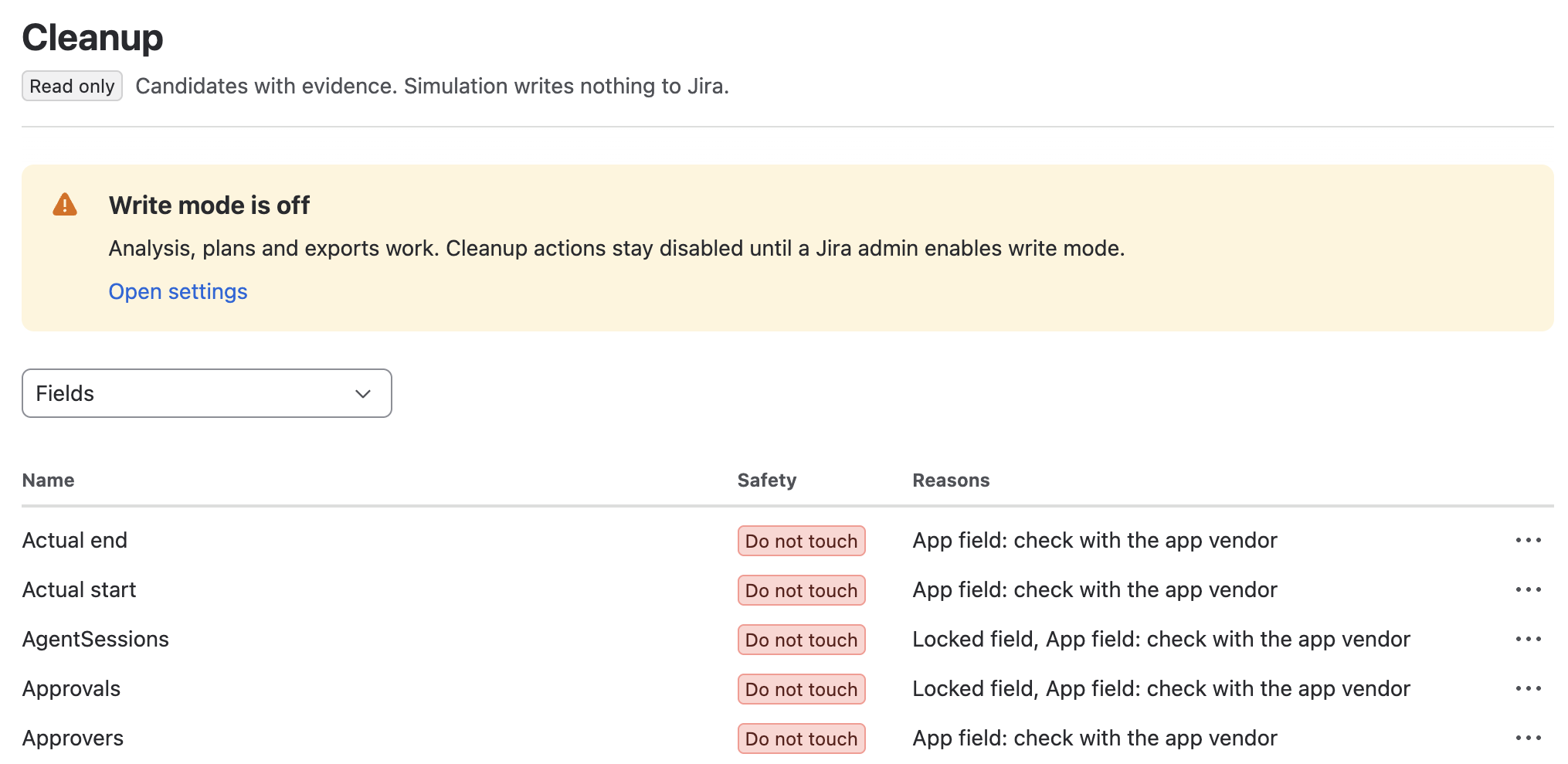
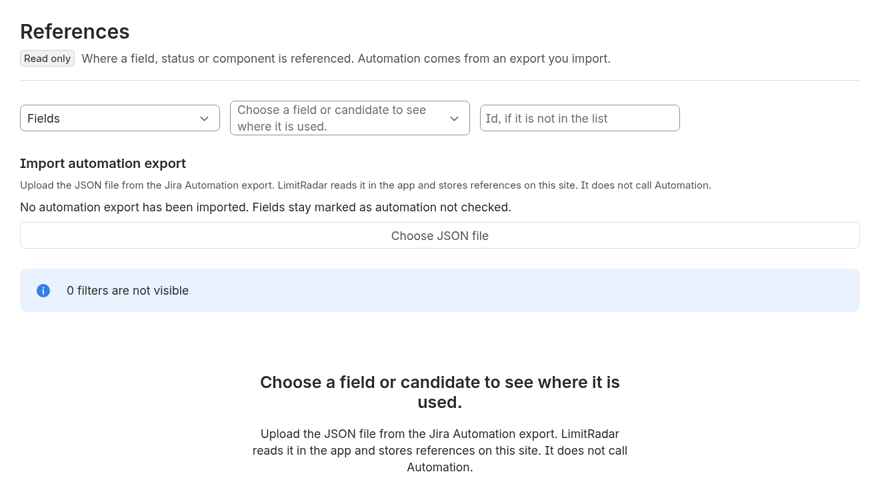
The safety levels are strict on purpose. A field Jira does not track as used, or that first appeared less than 30 days ago, is never Safe. Each scan looks for customfield_ IDs in saved filters, dashboard gadgets, screens, board configuration and workflows, and any reference makes the field Review. If some filters are private and invisible to the app, fields stay at Review. Forge apps cannot read Automation rules, so you export your rules as JSON and import the file on References; without an export less than 30 days old, every field carries Automation has not been checked and stays at Review.
Simulate shows the usage before and after for every space a field counts toward, for example Payments (PAY): 683 to 681 of 700. One field can count in many spaces, so one removal can lower several at once. The simulation writes nothing.
A plan runs only after a simulation of the same items is stored and you type the plan name. LimitRadar writes a JSON backup immediately before the run, reads each item from Jira again, skips anything that changed, and stops at the first error. A run handles up to 8 items in about 18 seconds. Fields always go to the Jira trash; LimitRadar has no code path that deletes a field permanently. The Actions log shows every action with Undo while it is available, and the Trash screen restores a trashed field during its 60 days, whoever trashed it. Two-person approval for plans is optional.
The honest limit: merges of (migrated) fields, deletes of workflows and schemes, and scheme clones have no undo, and the log says so. Other apps that use a field can still break after it is trashed. Threshold alerts after each scan, the Rovo agent and the signed PDF report are (Advanced).
Quick answers
What happens when you delete a custom field in Jira Cloud?
Jira does not delete it right away. It tags the field for deletion in 60 days and removes it at once from Automation, advanced workflow functions and apps that use it. Restore from the Deleted fields tab puts it back in all those places with its data. After the 60 days, the field and its values are gone.
Is removing a field from a field scheme the same as deleting it?
No. Removing a field from a field scheme hides its values in those spaces without deleting them, and adding it back brings them back.
When does LimitRadar mark a field as Safe to clean up?
Only when the checks find nothing. A field Jira does not track as used, or that first appeared less than 30 days ago, is never Safe. Any reference in saved filters, dashboard gadgets, screens, board configuration or workflows makes it Review, and without an imported Automation export less than 30 days old every field stays at Review.
Can LimitRadar delete a field permanently?
No. Fields always go to the Jira trash, and LimitRadar has no code path that deletes a field permanently. The Actions log shows every action with Undo while it is available, and the Trash screen restores a trashed field during its 60 days.