


700 fields per space in Jira Cloud: count, compare, forecast
Also published on Atlassian Community
Since March 2026, Jira Cloud enforces a limit of 700 fields per space. When a space reaches it, an admin cannot associate another field with that space until usage comes down. Most admins know the number. Far fewer know which of their spaces is closest to it.
LimitRadar is a limits and cleanup app for Jira Cloud from Radrly. This guide follows three steps, count, compare and forecast, first with what Jira gives you natively and then with what the app adds.
Step 1: count
Atlassian's page on data limits and guardrails sets out the counting rule. A field counts toward a space when it is included in the field schemes associated with that space. Trashed fields do not count. There is no limit on custom fields across the site, and one field can count toward several spaces at once.
On Premium and Enterprise, the site optimizer does the counting for you: Settings > System > Site optimizer, then Fields per space > Review in the Limits section. Per Optimize fields per space, it shows the spaces approaching or over the limit and how usage changed over time.
On Standard, Atlassian points you to the usage details in Jira settings, plus REST APIs or custom scripts for a detailed audit. In practice that means opening Settings > Work items > Field configuration schemes, reviewing each scheme and its spaces, and keeping a spreadsheet.
Step 2: compare
A raw count tells you little without context. Three comparisons help:
| Compare | Why it matters |
|---|---|
| Spaces that share a scheme | They hit the limit together, so one fix helps all of them |
| Count with and without locked fields | Locked fields cannot be removed, so they set your floor |
| This month against last month | A space at 500 that grows 40 a month is more urgent than one at 650 that never moves |
Natively, the first one is in the scheme screens, the second needs field-by-field checking, and the third needs snapshots you took yourself.
Step 3: forecast
The limit matters on the day someone needs one more field. Two things are worth knowing in advance. A bulk action that would take a space over the limit is rejected in full, with nothing partly applied. And if you migrated from Server or Data Center and landed at 90% or more of a limit, Jira applies a three-month temporary exemption for that entity, which ends on a date you should have in your calendar.
What LimitRadar adds
LimitRadar counts all 10 enforced configuration limits and the 4 guardrails for every space, on every Jira Cloud plan. It reads the right source whether your site uses the new field schemes or the legacy field configuration schemes, and it never shows an invented zero: a limit it could not read says so.
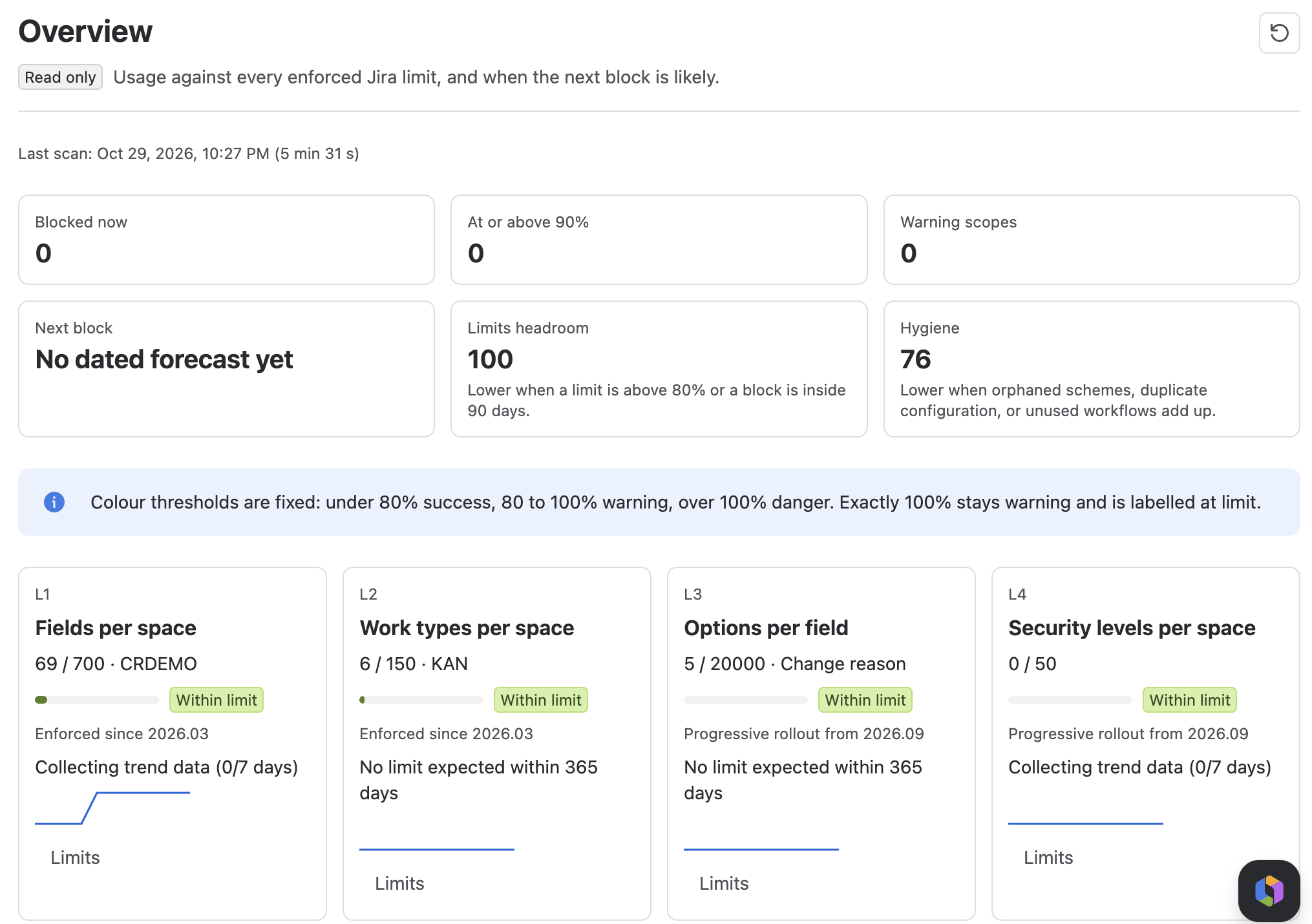
The Overview shows each limit with its highest scope, a colour band, and the enforcement status as Atlassian publishes it: Enforced since 2026.03 for fields and work types, Progressive rollout from 2026.09 for the other eight. Jira does not report whether a progressive limit is active on your site yet, so LimitRadar does not claim it is.
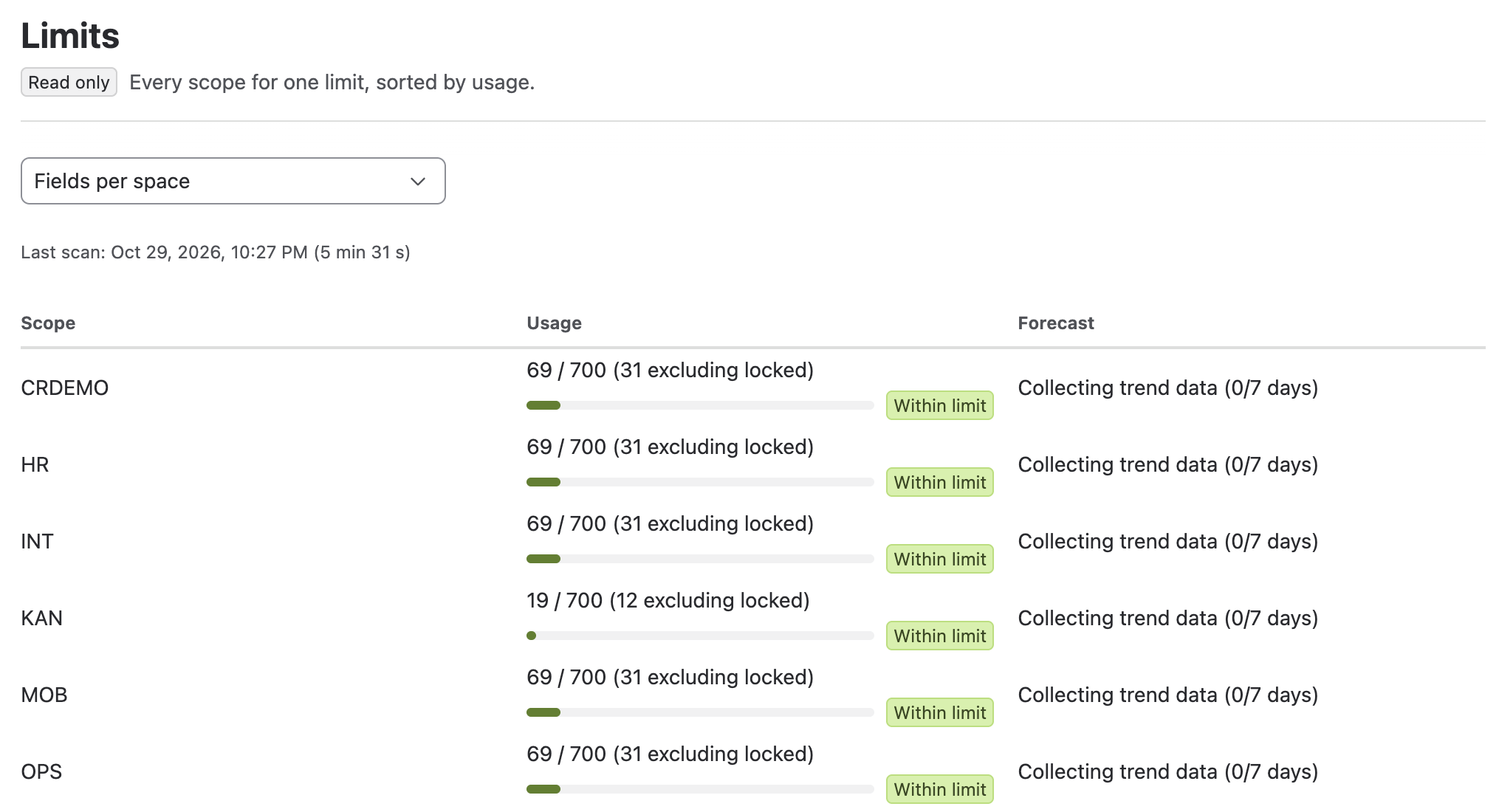
Pick Fields per space on the Limits screen to see every space sorted by usage, with the count excluding locked fields next to the total and the forecast status.
The forecast fits a Theil-Sen trend line to the daily counts of each space. With 14 or more daily points you get a date, with 7 to 13 an early estimate marked low confidence, and below 7 LimitRadar shows how many points it has collected so far. A flat or falling series shows No limit expected within 365 days. Next to block lists the spaces expected to reach a limit soonest, with Why (weekly growth or a contributing scheme) and Fastest fix (up to five unused candidates that would bring the space back to 80%). "What if I add", below the list, checks a bulk add before you run it and tells you whether Jira would accept it or reject the whole action. You can also enter your migration completion date to track the exemption.
LimitRadar is read-only at install. Cleanup needs write mode switched on by a Jira admin, and that is a topic for another guide. Real-time alerts and the Rovo agent are (Advanced).
Quick answers
What counts toward the 700 fields per space limit?
A field counts toward a space when it is included in the field schemes associated with that space. Trashed fields do not count, and one field can count toward several spaces.
How do I count fields per space on Jira Standard?
Atlassian points to usage details in Jira settings plus REST APIs or custom scripts. The site optimizer that does the counting is on Premium and Enterprise.
What happens if a bulk action would exceed the limit?
It is rejected in full, with nothing partly applied.